




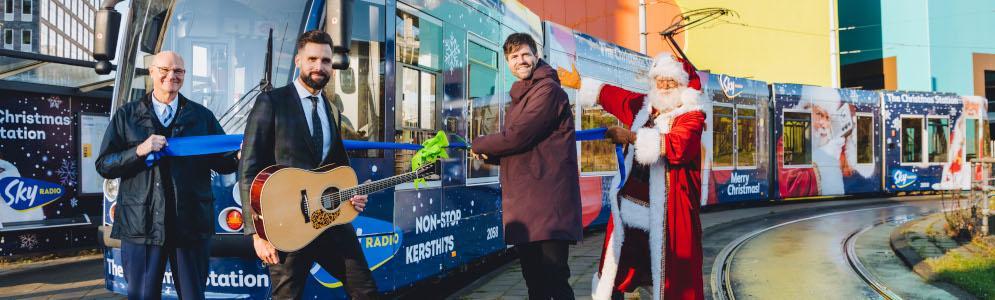
Nick & Simon openen Sky Radio kersttram

Artikel geplaatst door de redactie in Nederland
· 1.589 weergaven
Nick en Simon hebben vandaag op feestelijke wijze de Sky Radio kersttram in Amsterdam geopend. Onder luid applaus knipte het duo een lintje door, waarna de Sky Radio kerstman duizenden lichtjes en dwarrelende sneeuwvlokjes lanceerde. Daarmee werd het startschot gegeven voor het eerste ritje. Het ultieme kerstgevoel werd compleet met een optreden van Nick en Simon, die een akoestische versie van hun nieuwe single 'Christmas Time With You' ten gehore brachten.
“We vinden het echt te gek dat we de officiële Sky Radio kersttram mogen openen. In deze periode is het juist belangrijk dat we een lach op ieders gezicht toveren en het ultieme kerstgevoel bij mensen naar boven halen”, aldus Nick & Simon.
Sky Radio kersttram
De Sky Radio kersttram is al ruim 25 jaar een begrip. De tram rijdt dit jaar van 29 november t/m 26 december in Amsterdam. Reizigers worden geheel in kerstsferen van A naar B vervoerd. De tram is voorzien van een gigantische kerstmuts, duizenden lampjes, non-stop kersthits van The Christmas Station en hij rijdt iedere dag een andere route om zoveel mogelijk reizigers het kerstgevoel te kunnen bezorgen.
Sky Radio The Christmas Station
Sky Radio 101 FM is afgelopen vrijdag omgedoopt tot The Christmas Station. Luisteraars kunnen sindsdien weer genieten van non-stop de beste kersthits. Sky Radio The Christmas Station is ook te beluisteren via skyradio.nl, JUKE, DAB+ en de gratis Sky-app.
Afbeelding: Nick en Simon (foto Sky Radio The Christmas Station)
Aanbevolen antwoorden
Doe mee aan het gesprek
Je plaatst een bericht als gast. Indien je al een account hebt, kun je je nu aanmelden om het bericht met je account te plaatsen.
Opmerking: Je bericht moet eerst worden goedgekeurd door een moderator voordat het zichtbaar is.