




Luisteronderzoek Week 30 2023: NPO Radio 2 blijft marktleider, Sky Radio stijgt naar nummer 4

Artikel geplaatst door de redactie in Luisteronderzoek
· 1.396 weergaven
Vandaag zijn de luistercijfers van de Nederlandse radiostations weer bekendgemaakt, en NPO Radio 2 blijft onverminderd populair. Met een marktaandeel van 14,4% wist het station zijn nummer 1 positie te behouden, ondanks een lichte daling ten opzichte van de vorige week (14,8%).
Op de tweede plaats vinden we Qmusic met een marktaandeel van 11,2%, wat een kleine daling betekent ten opzichte van de vorige week (12,2%). Ook Radio 10 wist zijn positie vast te houden, met een stabiel marktaandeel van 10,3%.
Opvallend is de opmars van Sky Radio, dat met een marktaandeel van 9% de vierde positie inneemt. De zender steeg aanzienlijk ten opzichte van de vorige week (7,3%) en weet zich daarmee te nestelen in de top 5 van best beluisterde radiostations.
NPO Radio 1 sluit de top 5 af met een marktaandeel van 8,7%, een lichte daling ten opzichte van de vorige week (8,9%).
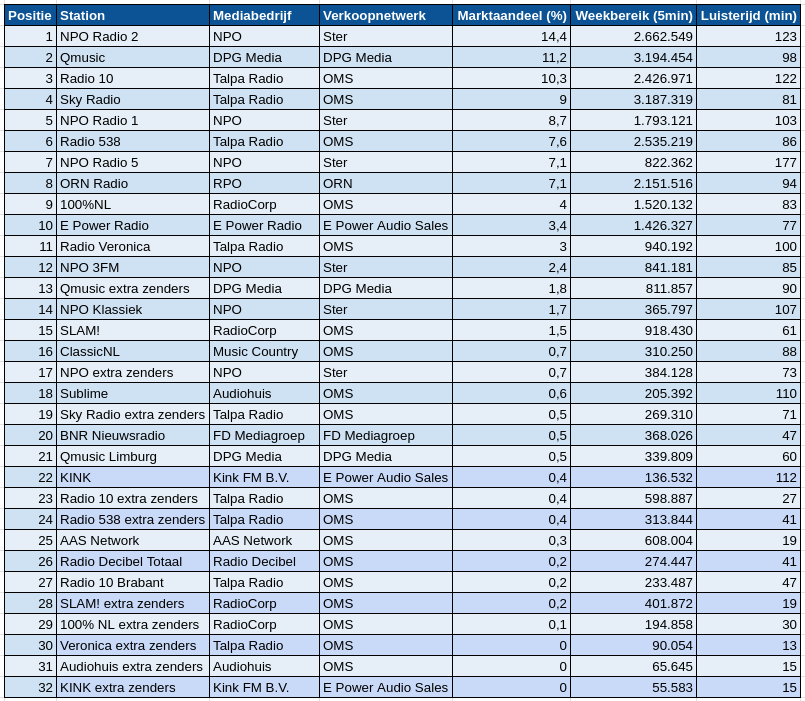
Bron: NMO/Ipsos-Kantar
Aanbevolen antwoorden
Doe mee aan het gesprek
Je plaatst een bericht als gast. Indien je al een account hebt, kun je je nu aanmelden om het bericht met je account te plaatsen.
Opmerking: Je bericht moet eerst worden goedgekeurd door een moderator voordat het zichtbaar is.