





Topcijfers bezorgen Qmusic 'Sweet Sixteen'

Artikel geplaatst door de redactie in Nederland
· 1.780 weergaven
Het is vandaag precies 16 jaar geleden dat Qmusic in Nederland haar eerste uitzenddag beleefde. Naast de verjaardag geven ook de nieuwste luistercijfers reden tot feest: de Top 40 scoort het hoogste marktaandeel sinds in ieder geval 1996 in de doelgroep 20-49 jaar: 22,7%. Zenderbreed behaalt Q ook de beste juni/juli-meting ooit.
Het marktaandeel van Qmusic komt deze luistercijfermeting uit op 20,3% in de doelgroep 20-49 jaar. Dit betekent een stijging van 9% ten opzichte van dezelfde periode vorig jaar, toen het marktaandeel 18,6% bedroeg. Sinds 1999 heeft geen enkele radiozender in deze meetperiode zo'n hoog marktaandeel weten te behalen in de doelgroep 20-49 jaar.
image
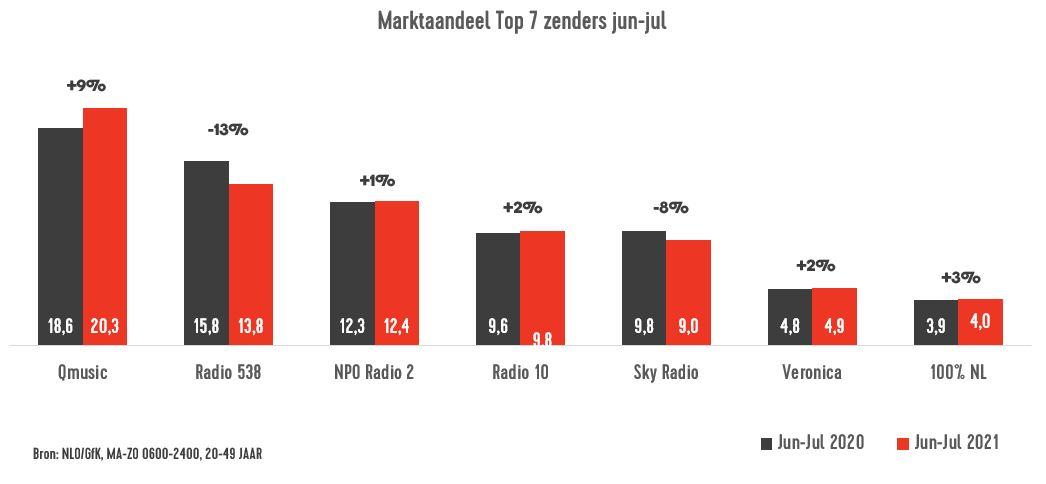
Marktaandeel jun-jul 2020 en 2021, bron: NLO/GfK, doelgroep 20-49 jaar
De Top 40 op vrijdagmiddag scoort zelfs een marktaandeel van 22,7% en heeft in ieder geval sinds 1996 niet zo goed gescoord. Van voor die tijd zijn geen cijfers voorhanden.
In de doelgroep 10+ haalt Qmusic het hoogste marktaandeel in haar bestaan en loopt de zender nog meer in op NPO Radio 2. Het marktaandeel bedraagt hier 11,9%, ten opzichte van 12,1% voor NPO Radio 2. In absoluut bereik is Qmusic wel marktleider: 2.793.000 luisteraars stemden per week af op de zender.
Al met al is het een Sweet Sixteen voor Qmusic. Als klap op de vuurpijl werd vanochtend ook toevallig Het Geluid geraden.





Aanbevolen antwoorden
Doe mee aan het gesprek
Je plaatst een bericht als gast. Indien je al een account hebt, kun je je nu aanmelden om het bericht met je account te plaatsen.
Opmerking: Je bericht moet eerst worden goedgekeurd door een moderator voordat het zichtbaar is.