




Luisteronderzoek Week 46 2023: Qmusic neemt koppositie over van NPO Radio 2

Artikel geplaatst door de redactie in Luisteronderzoek
· 1.101 weergaven
Qmusic zich in week 46 gekroond tot de nummer 1 radiozender in Nederland. Met een indrukwekkend marktaandeel van 14,2% heeft Qmusic zijn positie versterkt, wat een aanzienlijke stijging is ten opzichte van de voorgaande week waarin het station 12,8% marktaandeel behaalde.
NPO Radio 2, dat in de voorgaande week de leidende positie bekleedde, volgt nu op de tweede plaats met een marktaandeel van 12,6%. Hoewel dit een lichte daling is ten opzichte van de voorgaande week, blijft het station een prominente speler in het radiolandschap.
Sky Radio behoudt zijn derde positie met een marktaandeel van 8,9%, een bescheiden stijging ten opzichte van het voorgaande percentage van 8,7%.
Radio 10 en NPO Radio 1 sluiten de top vijf af met elk een marktaandeel van 8,9% en 8,8% respectievelijk.
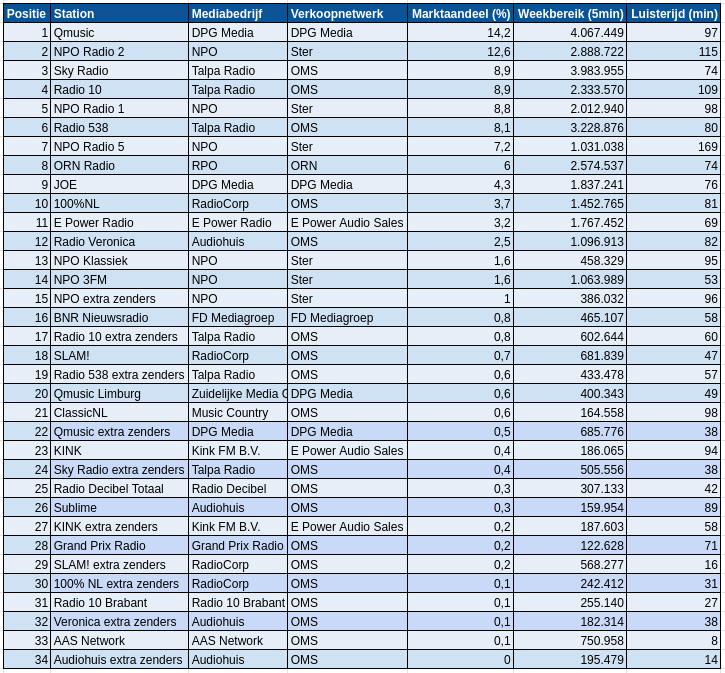
Bron: NMO/Ipsos-Kantar




Aanbevolen antwoorden
Doe mee aan het gesprek
Je plaatst een bericht als gast. Indien je al een account hebt, kun je je nu aanmelden om het bericht met je account te plaatsen.
Opmerking: Je bericht moet eerst worden goedgekeurd door een moderator voordat het zichtbaar is.