





Luisteronderzoek week 8 2026: Qmusic wint licht terrein, NPO Radio 2 levert in

Artikel geplaatst door de redactie in Luisteronderzoek
· 467 weergaven
Uit het luisteronderzoek over week 8 van 2026, gemeten van 16 t/m 22 februari, blijkt dat NPO Radio 2 zijn eerste plaats behoudt. De zender noteert deze week een marktaandeel van 13,0%, tegenover 14,3% een week eerder. Ondanks het verlies blijft het station marktleider.
Qmusic staat opnieuw op de tweede plaats en laat een lichte groei zien. Het marktaandeel stijgt van 11,0% naar 11,3%. Daarmee verstevigt de zender zijn positie in de top van het klassement.
Op de derde plaats staat NPO Radio 1 met 8,9%, een fractie hoger dan de 8,8% van vorige week. Radio 538 volgt op de vierde plaats met 8,1%, een daling ten opzichte van 8,4% een week eerder. De vijfde positie is in handen van NPO Radio 5, dat stijgt van 7,6% naar 8,0% en daarmee de aansluiting met Radio 538 vergroot.
Stijgers: Qmusic, NPO Radio 1, NPO Radio 5, Sky Radio, Radio 10, Radio Veronica, E Power, Radio 10 extra zenders, NPO 3FM, Qmusic extra zenders, NPO Sterren NL, Grand Prix - Sport Radio
Dalers: NPO Radio 2, Radio 538, RPO Radio, JOE, BNR Nieuwsradio, SLAM!, KINK, Qmusic Limburg, Radio 538 extra zenders
Gelijk: 100%NL, NPO Klassiek, Veronica extra zenders, Radio Noordzee, Radio 8FM, Decibel, KINK extra zenders
Het Luisteronderzoek biedt inzicht in de luistercijfers van radiostations in Nederland en wordt wekelijks gepubliceerd.
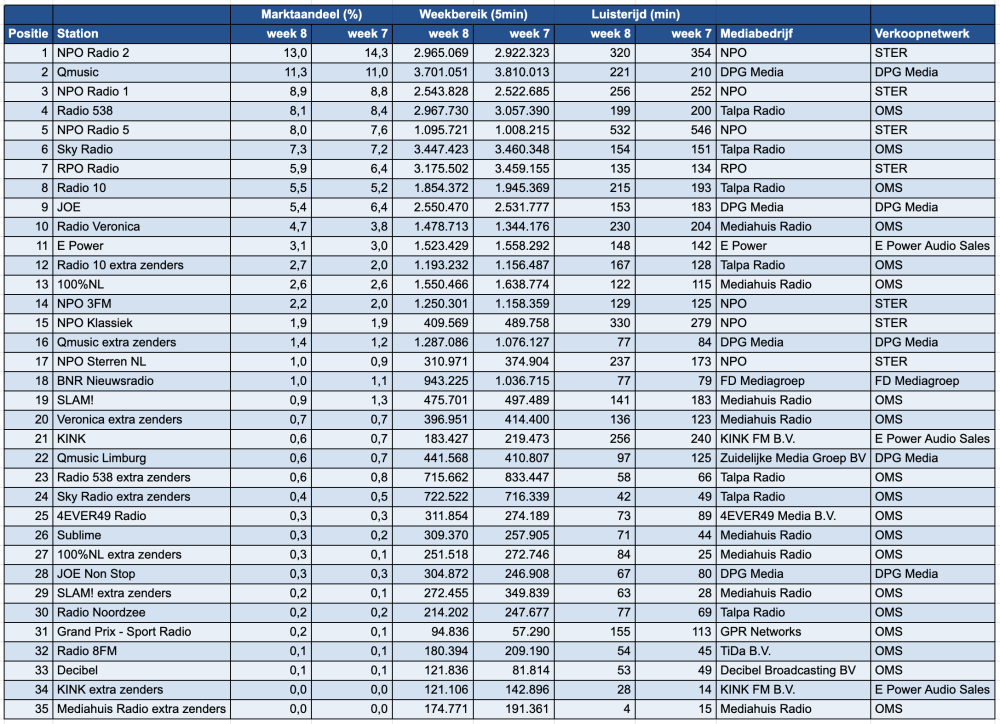
Bron: NMO/Ipsos-Kantar



Aanbevolen antwoorden
Doe mee aan het gesprek
Je plaatst een bericht als gast. Indien je al een account hebt, kun je je nu aanmelden om het bericht met je account te plaatsen.
Opmerking: Je bericht moet eerst worden goedgekeurd door een moderator voordat het zichtbaar is.