




Luisteronderzoek Week 10 2024: Qmusic stijgt naar de eerste plaats dankzij de 90's Top 500

Artikel geplaatst door de redactie in Luisteronderzoek
· 1.004 weergaven
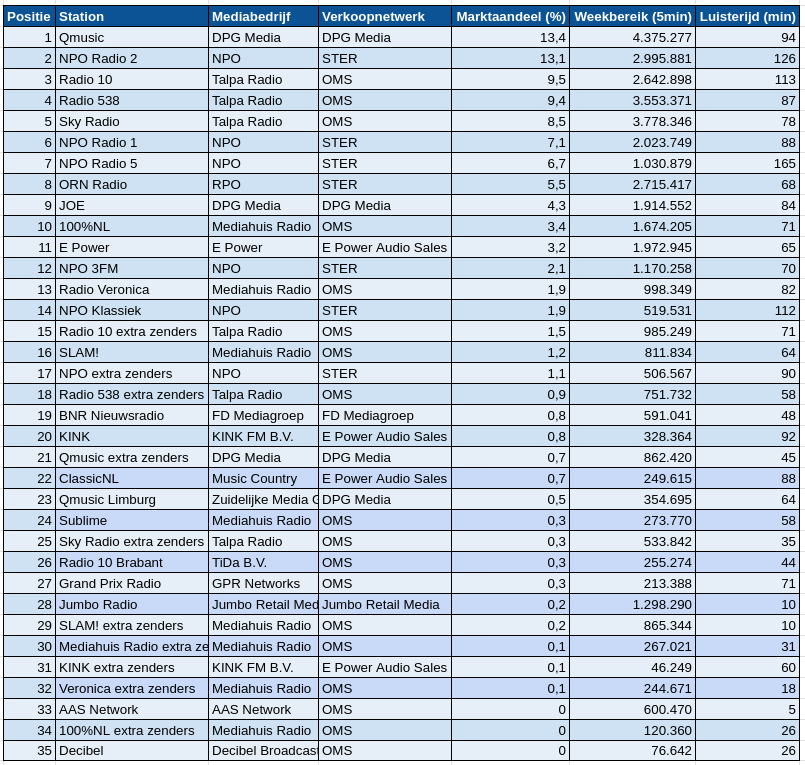
Uit het Luisteronderzoek van Week 10, dat liep van 4 maart 2024 tot en met 10 maart 2024, blijkt dat Qmusic de leiding heeft genomen met een marktaandeel van 13,4%. Deze stijging kan worden toegeschreven aan het succes van de 90s Top 500, die in deze week werd uitgezonden.
Op de tweede plaats staat NPO Radio 2 met een marktaandeel van 13,1%, gevolgd door Radio 10 met 9,5% en Radio 538 met 9,4%. Sky Radio sluit de top vijf af met een marktaandeel van 8,5%.
NPO Radio 5 behaalde de hoogste luistertijd met 165 minuten, terwijl Qmusic het grootste weekbereik had met 4.375.277 luisteraars.
Het Luisteronderzoek biedt inzicht in de luistercijfers van radiostations in Nederland en wordt wekelijks gepubliceerd.
Bron: NMO/Ipsos-Kantar



Aanbevolen antwoorden
Doe mee aan het gesprek
Je plaatst een bericht als gast. Indien je al een account hebt, kun je je nu aanmelden om het bericht met je account te plaatsen.
Opmerking: Je bericht moet eerst worden goedgekeurd door een moderator voordat het zichtbaar is.