




Luisteronderzoek Week 6 2024: NPO Radio 2 blijft leider

Artikel geplaatst door de redactie in Luisteronderzoek
· 1.021 weergaven
Volgens het recente luisteronderzoek van Week 6, dat liep van 5 februari 2024 tot en met 11 februari 2024, behield NPO Radio 2 de eerste positie met een marktaandeel van 15,9%, ten opzichte van 14,7% in de voorgaande week.
Op de tweede plaats staat Qmusic met een marktaandeel van 11,5%, iets lager dan de 11,7% van de week ervoor. Radio 10 volgt op de derde plaats met 9,9% marktaandeel, een daling ten opzichte van de 10,7% in de voorgaande week.
Radio 538 en Sky Radio nemen respectievelijk de vierde en vijfde plaats in, met marktaandelen van 8,7% en 8,6%. Radio 538 zag een lichte daling van 9,2% naar 8,7%, terwijl Sky Radio een kleine stijging kende van 8,4% naar 8,6%.
NPO Radio 5 behaalde de hoogste luistertijd met 178 minuten, terwijl Sky Radio het grootste weekbereik had met 3.976.203 luisteraars.
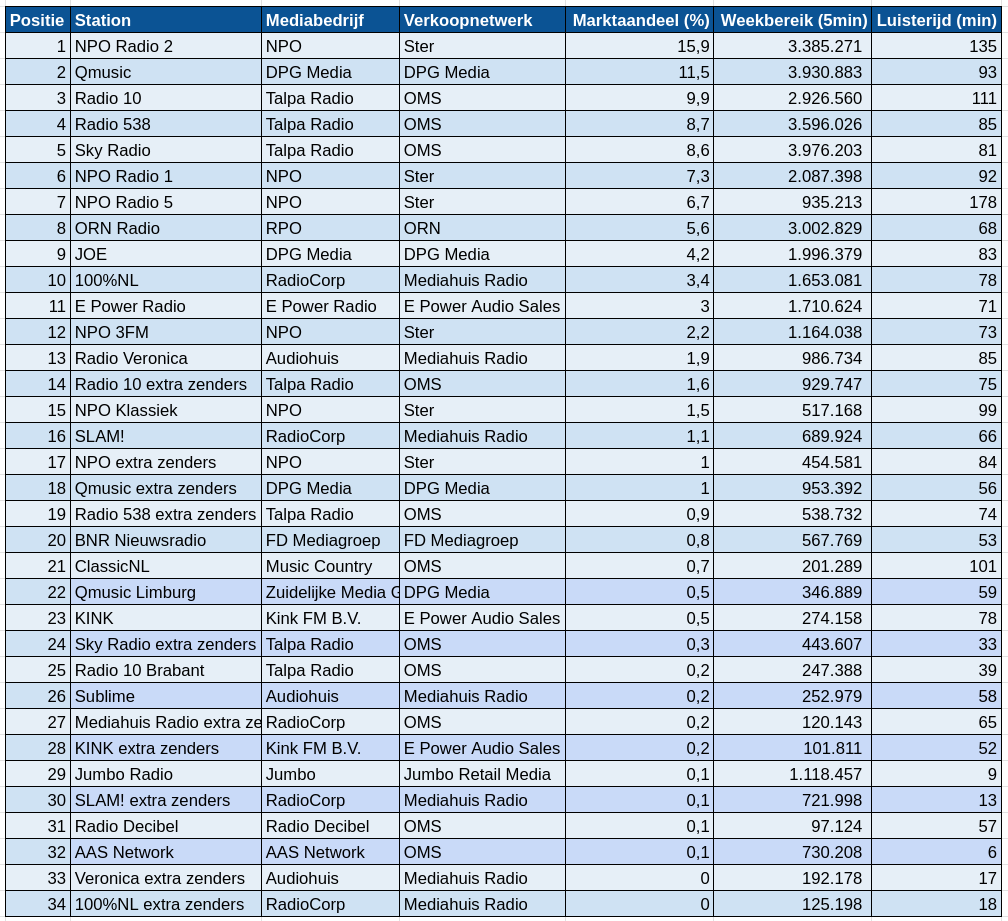
Bron: NMO/Ipsos-Kantar



Aanbevolen antwoorden
Doe mee aan het gesprek
Je plaatst een bericht als gast. Indien je al een account hebt, kun je je nu aanmelden om het bericht met je account te plaatsen.
Opmerking: Je bericht moet eerst worden goedgekeurd door een moderator voordat het zichtbaar is.