




Luisteronderzoek Week 4 2025: NPO Radio 5 stijgt naar derde plek, NPO Radio 2 blijft marktleider

Artikel geplaatst door de redactie in Luisteronderzoek
· 1.097 weergaven
De luistercijfers van week 4 (20 januari - 26 januari 2025) laten enkele verschuivingen in het radiolandschap zien. NPO Radio 2 blijft de best beluisterde zender met een marktaandeel van 13,1%, al is dit lager dan de 14,2% van de voorgaande week. Qmusic blijft op de tweede plaats met 10,6%, een daling ten opzichte van 11,3%.
De opvallendste verschuiving komt van NPO Radio 5, dat stijgt naar de derde positie met een marktaandeel van 8,7%. Daarmee passeert het Radio 538, dat zakt naar de vierde plek met 8,6% (vorige week 8,8%). NPO Radio 1 blijft stabiel op de vijfde plek en stijgt licht van 7,9% naar 8,3%.
Opvallende ontwikkelingen
- NPO Radio 5 behaalt de langste gemiddelde luistertijd van alle zenders: 183 minuten per luisteraar.
- Qmusic heeft het hoogste weekbereik met 3.923.820 luisteraars, een daling ten opzichte van de 4.090.433 van vorige week.
- Radio Veronica laat een sterke groei zien en stijgt van 4,1% naar 4,9%, mede dankzij de 80’s Top 1000.
- JOE wint marktaandeel en stijgt van 5,0% naar 5,7%.
Het Luisteronderzoek biedt inzicht in de luistercijfers van radiostations in Nederland en wordt wekelijks gepubliceerd.
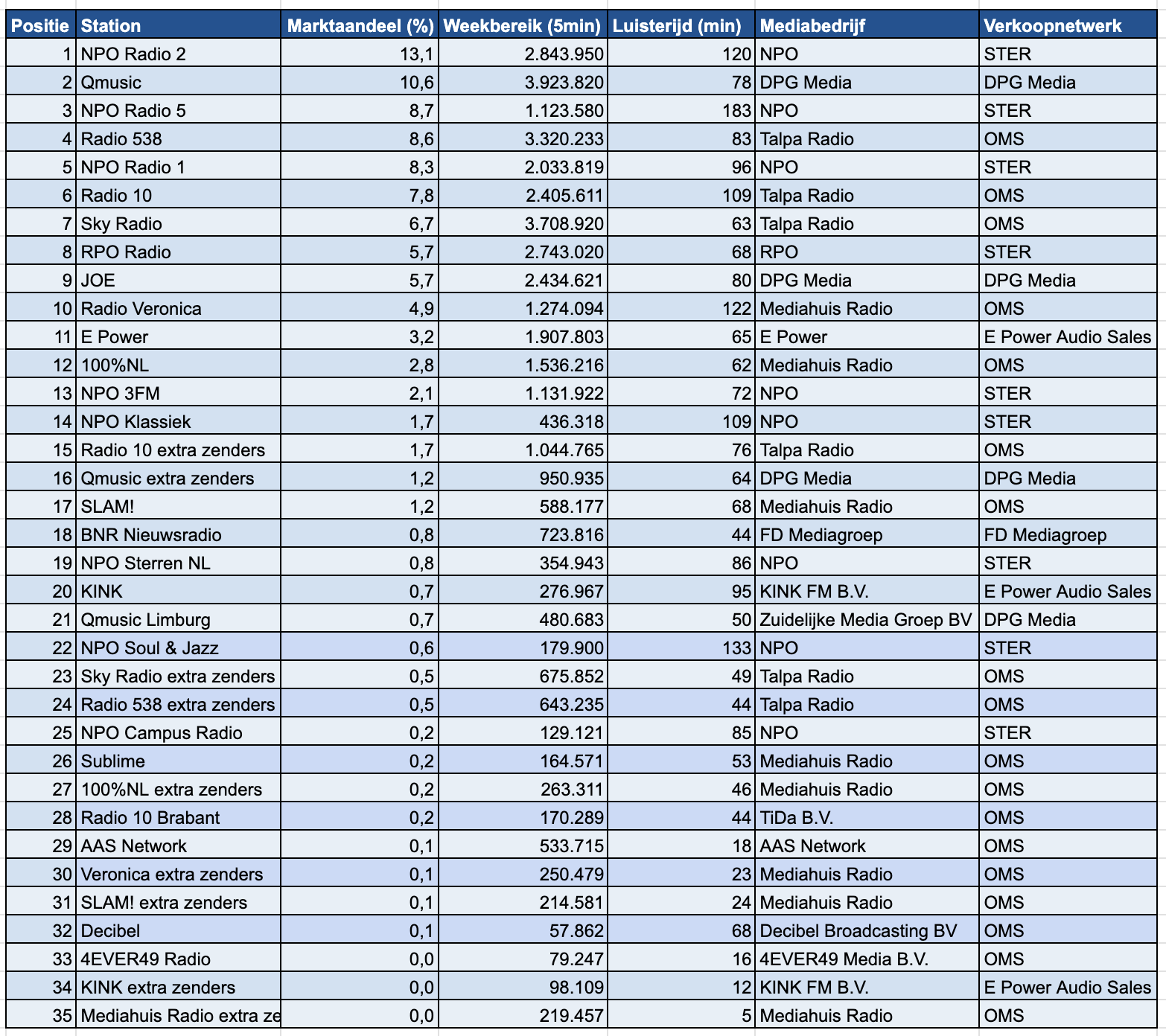
Bron: NMO/Ipsos-Kantar
-
 1
1



Aanbevolen antwoorden
Doe mee aan het gesprek
Je plaatst een bericht als gast. Indien je al een account hebt, kun je je nu aanmelden om het bericht met je account te plaatsen.
Opmerking: Je bericht moet eerst worden goedgekeurd door een moderator voordat het zichtbaar is.